Streamline your business operations and securely connect internal apps using modern AI workflow automation tools.
Modern AI workflow automation tools streamline complex operational pipelines by connecting foundation models directly to enterprise applications via secure APIs and retrieval-augmented generation (RAG) frameworks. Engineering teams deploy these systems to eliminate data silos, reduce process-related errors by 67%, and transition from brittle, rule-based logic to autonomous, context-aware decision-making.
The era of point-to-point hardcoded automation is ending. For years, IT departments relied on rigid conditional branching—nested “if-then” statements that broke the moment an upstream data schema changed or an edge case emerged. Today, engineering leaders face a massive influx of unstructured data, from complex vendor PDFs to multi-system infrastructure dependencies, requiring a far more resilient architectural foundation.
Engineering teams are addressing this complexity by embedding intelligent agents directly into execution layers. According to a Gartner Market Forecast, 40% of enterprise applications will feature task-specific AI agents by the end of 2026, up from less than 5% just a year prior. This shift allows organizations to safely scale infrastructure, reduce operational overhead, and maintain absolute compliance across disparate software environments.
Here is how modern engineering leaders can successfully design, evaluate, and deploy these advanced automation stacks.
What Are AI Workflow Automation Tools?
AI workflow automation tools are software platforms and developer frameworks that coordinate multi-step software processes by using artificial intelligence to handle reasoning, data transformation, and decision-making. Unlike legacy systems that require precise, explicit rules for every scenario, these tools use foundation models to interpret intent, parse unstructured inputs, and dynamically select the optimal path to execute a specific objective.
Defining Agentic Automation vs. Traditional If-This-Then-That (IFTTT) Systems
Traditional enterprise automation tools excel at simple, predictable tasks, such as moving a structured data row from a webhook to a database table. However, they lack semantic understanding; if a vendor changes an invoice layout or includes a non-standard currency symbol, a traditional pipeline immediately halts, requiring manual script updates.
Agentic automation introduces an autonomous evaluation layer. Instead of following a predetermined script, an agentic framework receives a high-level goal, evaluates available tools, and breaks down the objective into sequential actions. Published research regarding intelligent systems indicates that organizations implementing these agentic frameworks achieve a 20% to 30% reduction in operational costs beyond the capabilities of standard automation, due to the system’s ability to self-correct and handle edge cases natively.
Core Components: Large Language Models (LLMs), Vector Databases, and API Connectors
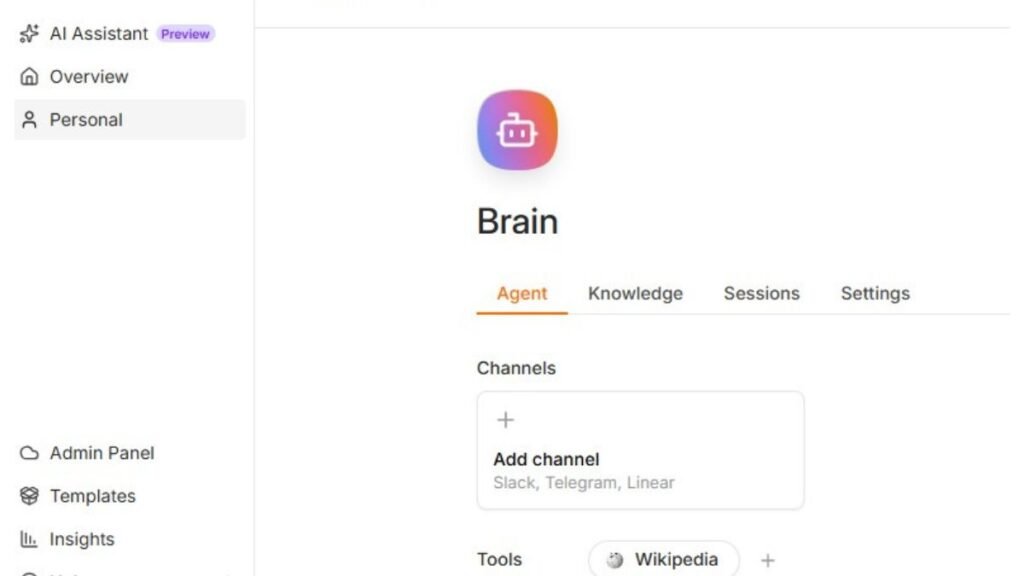
Building a scalable AI automation framework requires three fundamental pillars:
- The Reasoning Layer (LLMs & Small Language Models): Think of this as the main brain of the system. It figures out what the user wants, organizes the information, and writes temporary code on the spot to get the job done. Organizations increasingly rely on specialized, smaller models hosted locally to minimize processing latency and compute costs.
- The Contextual Memory Layer (Vector Databases): Uses high-dimensional vector embeddings to supply running agents with immediate business context. This contextual vector layer injects immediate business realities directly into the model’s temporary processing memory by sourcing real-time system logs and corporate knowledge bases. Supplying this localized data dynamically neutralizes AI hallucinations and false outputs, completely bypassing the need for heavy computing costs.
- The Execution Layer (API Connectors & Tool Integration): Converts autonomous model logic into real-world software actions. These components turn text instructions into executable actions, allowing the system to securely write to internal databases, call webhooks, or interact with legacy enterprise resource planning (ERP) platforms.
Best AI Workflow Automation Tools: An Architectural Comparison
Selecting the right automation tool requires balancing developer flexibility with enterprise governance. Companies often struggle because they pick tools that don’t fit right. Some tools are too rigid for tough engineering work, while others are just too complicated for everyday operations teams to keep running.
The market generally splits into three distinct categories: developer-first open-source engines, enterprise suites, and code-native agent frameworks.
Automated Operational Framework: Three Architectural Approaches
- Self-Hosted Isolated Engine (Source-Aware)
- Local Node Scripts: Executes custom runtime code securely within your private infrastructure.
- Visual Graph Nodes: Simplifies workflow mapping using visual data flowcharts.
- Native Code Blocks: Enables executing core backend code with absolute pipeline control.
- Corporate Managed Regulated Hubs (Legacy Gateways)
- Audit Trail Logging: Keeps exhaustive, tamper-proof logs for strict enterprise compliance.
- Enterprise Security: Integrates deeply with centralized corporate identity and access protocols.
- Cloud Token Controls: Monitors and limits API usage to prevent unexpected billing spikes.
- Programmatic Logical Matrix (Orchestrators)
- Multi-Agent State: Manages autonomous communication and memory across multiple AI agents.
- Dynamic Prompt Wrapping: Adjusts prompt contexts on the fly based on changing runtime inputs.
- Context Embedded Memory: Uses vector storage to feed real-time business context directly into execution loops.
A standard automation stack typically features one of three architectural approaches.
- Developer-First Open-Source Engine (e.g., n8n): Highly favored for workflows that require complex data manipulation and local hosting. Because it is source-available, engineers can review the execution code, build custom JavaScript/Python nodes, and host it within their own VPC to keep data secure according to the n8n Self-Hosting and Deployment Documentation.
- Enterprise Suites (e.g., Microsoft Power Automate, Workato): These platforms prioritize strict governance, deep active directory integrations, and compliance. Enterprise frameworks target massive administrative environments where data auditing is a strict operational mandate. These corporate systems run specialized background agents that bridge outdated internal mainframe terminals with modern web-based computing clusters, ensuring all transaction logs stay fully compliant under centralized security protocols.
- Code-Native Agent Frameworks (e.g., LangChain, CrewAI): These frameworks move away from visual canvases entirely, relying on code to chain LLMs, vector memory, and external APIs. They provide maximum flexibility for building autonomous software agents that can reason through multi-step objectives.
The table below breaks down the technical differences between these three approaches:
| Feature | Open-Source Engines (n8n) | Enterprise Suites (Power Automate) | Code-Native Frameworks (CrewAI) |
| Primary Operator | DevOps & Backend Engineers | IT Admins & Business Analysts | AI Engineers & Software Architects |
| Deployment Mode | Self-hosted Docker / Cloud | Managed SaaS / On-Premise Gateway | Python / TypeScript Runtime Environment |
| Data Privacy | Full local control over data pipelines | Governed by vendor data agreements | Dependent on hosted cloud LLM endpoints |
| Logic Handling | Visual graphs combined with code blocks | Visual drag-and-drop with expressions | Pure programmatic execution loops |
| Ideal Use Case | Complex multi-API engineering workflows | Legacy system syncs and compliance tasks | Highly dynamic, autonomous agent fleets |
Core Evaluation Framework: How to Choose Your Enterprise Automation Stack
Engineering teams should evaluate automation platforms using a clear framework focused on security, execution predictability, and cost efficiency.
Data Security, GDPR/SOC 2 Compliance, and Local LLM Execution
Data exposure is the biggest risk when using public AI endpoints. When workflows process protected health information (PHI) or personally identifiable information (PII), sending data to external APIs can violate GDPR or SOC 2 regulations.
Core Best Practice: Ensure your chosen automation platform can run locally inside a private cloud and connect to open-source models (such as Llama 3 or Mistral) through local inference tools like Ollama or vLLM. This keeps sensitive data entirely within your network. If you want to explore live data on international laws or strictly isolated pipelines, you can read our case study, OpenAI’s Secret Move in the EU and Sovereign Nodes. It explains exactly how large enterprise networks are setting up local infrastructure to stay compliant with global borders.
Multi-Modal Capabilities: Processing Text, Audio, and Computer Vision
In modern systems, data rarely arrives as perfectly formatted text anymore. A resilient automation platform must handle multiple data formats seamlessly. For example, a logistics pipeline might need to extract text from a poorly scanned shipping bill using computer vision, transcribe an audio confirmation from a field agent, and update a central SQL database all in one run. Look for tools that offer native support for multi-modal model endpoints without requiring custom, complex preprocessing scripts.
Cost Per Execution: Managing Token Consumption and API Overhead
Operating an automation system introduces ongoing runtime expenses. Relying on large, expensive frontier models for simple tasks like data classification can quickly blow through budgets.
[Incoming Request]
       |
       |
[Routing Component] ---> Simple Task? -----> Run Local Small Model (e.g., Phi-3) -> $0.0001
       |
       +---------------> Complex Reasoning? -> Run Frontier Model (e.g., GPT-4o)  -> $0.0500
To control costs, pick a platform that lets you route tasks to different models based on complexity. Use small, fast models for basic classification or formatting, and save the larger, expensive models for complex reasoning or final reviews.
Real-World Blueprint: The Automated Vendor Invoice Pipeline
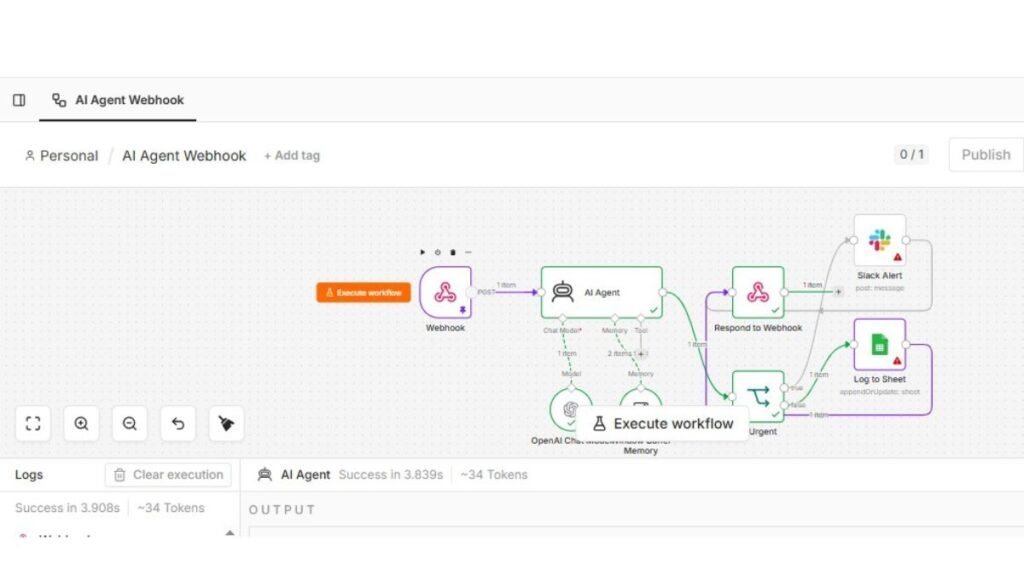
To see how these principles work in practice, let’s look at a common automation setup: a multi-modal invoice ingestion system built on an open-source platform like n8n.
- Ingestion: A webhook triggers whenever a new invoice email arrives. The automation platform extracts the PDF attachment and converts the document pages into images.
- Context Assembly: The system queries a local vector database using a semantic search to pull historical vendor contract terms and matching purchase order numbers.
- Local Inference Execution: A small, self-hosted vision model processes the images alongside the retrieved contract terms. It extracts line items, calculates tax totals, and flags any unexpected price discrepancies.
- Human-in-the-Loop Check: If the model’s confidence score drops below 92%, the workflow pauses and sends a notification to a Slack channel, allowing an accounts payable analyst to review and fix the issue manually.
- Downstream Write: Once verified, the system transforms the data into a clean JSON payload and updates the internal ERP platform via a secure API call.
Step-by-Step Implementation Guide for Engineering Teams
Moving an automation project from a local test environment to a production cluster requires a structured deployment plan. Brittle prompt engineering or poorly controlled access keys will cause production pipelines to fail under load. Following a methodical, three-phase deployment plan keeps your systems resilient and predictable.
Phase 1: Mapping Current Operational Bottlenecks and Manual Tasks
Before writing code or provisioning cloud infrastructure, you must isolate the specific business logic you want to automate. Teams often fail when they try to automate an entire department at once instead of focusing on discrete, repeating tasks.
- Audit Your Data Inputs: Review the incoming data for the target process. Document the ratio of structured data (like CSV files or database rows) to unstructured data (like raw emails or images).
- Establish Baseline Metrics: Document how long the manual process currently takes, its error rate, and the system dependencies involved. Now you have a clear starting line to track and prove your financial return.
- Isolate Decision Points: Pinpoint exactly where human staff must use critical thinking or compliance knowledge to make a decision. These inflection points are where you should place your reasoning models.
Phase 2: Building Secure RAG Pipelines for Context-Aware Agents
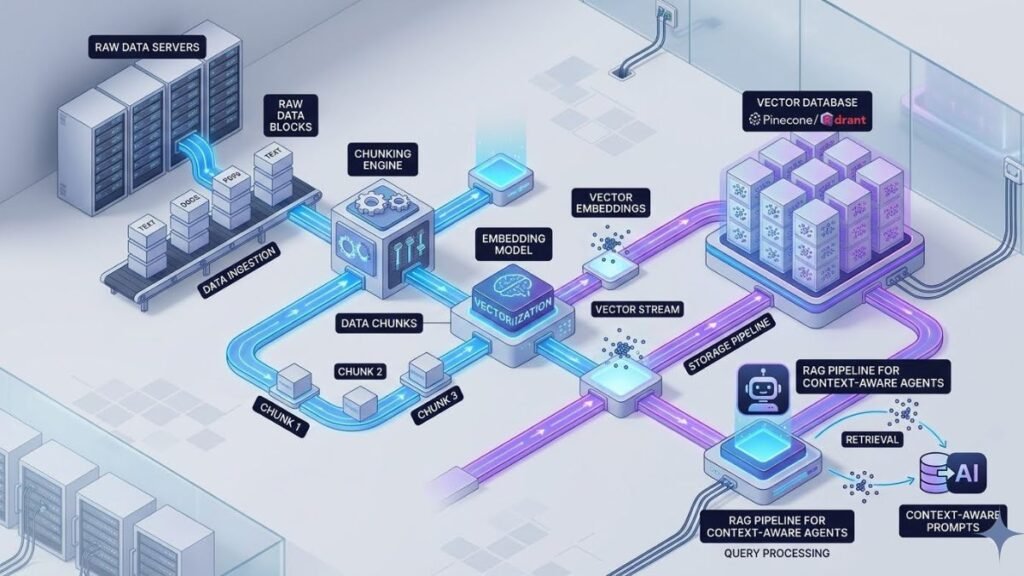
To ensure your automated agents make accurate decisions, you need to provide them with relevant, real-time internal data. A production-grade retrieval-augmented generation (RAG) architecture securely handles this data injection without exposing your core intellectual property to public model training datasets.
+--------------------+

|  Production Data   |
| (ERP / Knowledge)  |
+--------------------+
          |
          |
+--------------------+

| Document Chunking  |
|  & Text Stripping  |
+--------------------+
          |
          |
+--------------------+

| Embedding Engine   |
|  (e.g., nvon-text) |
+--------------------+
          |
          |
+--------------------+

|  Vector Database   |
| (Pinecone / Qdrant)|
+--------------------+
- Ingest and Clean Data: Build ingestion scripts that pull internal documentation, standard operating procedures, and product schemas out of corporate silos. Strip away formatting artifacts to leave only clean text.
- Turn text into vectors: Convert plain text into math blocks and store them in a specialized vector database for smart search.
- Configure Semantic Search: Set up your automation engine to run a semantic search against your vector database whenever a new request arrives. This allows the system to pull relevant context and append it directly to the model’s prompt window.
Phase 3: Setting Up Continuous Monitoring, Guardrails, and Human-in-the-Loop Checkpoints
Autonomous systems require strict operating boundaries to ensure they run safely and predictably in production.
- Apply Input/Output Guardrails: Deploy a lightweight validation layer between your automation platform and your model endpoints. This layer inspects incoming payloads for prompt injection attacks and scans outgoing text to block unauthorized data leaks.
- Establish Human-in-the-Loop (HITL) Triggers: Design your system to route complex or low-confidence tasks to a human supervisor. For example, if a model’s confidence score drops below a specific threshold, the workflow should pause and alert an administrator via a webhook notification.
- Track Operational Metrics: Monitor token usage, processing latency, and error rates using centralized log analyzers. Tracking these metrics helps you identify performance bottlenecks and optimize your API spending over time.
Common Pitfalls in AI Automation and How to Evade Them
Deploying enterprise AI workflows exposes architectural blind spots that traditional coding practices and legacy methodologies fail to protect.
The Danger of Hallucinations in Unmonitored Production Environments
Foundation models occasionally generate false information with high statistical confidence. If your system writes these hallucinations directly to a production database without validation, it can corrupt downstream reporting and tracking systems.
How to Evade It: Never allow an LLM to write directly to your core databases without strict validation rules. Set up a mandatory verification layer that checks every single data output before it gets saved.
Use deterministic regex layers, structural schema checkers, or secondary model validations to verify that all dates, currency values, and account numbers exist and match expected formats before final insertion.
Over-Engineering Simple Pipelines with Expensive Foundation Models
Using a frontier reasoning model to extract a simple date string from a standard web form wastes money and computing resources. It introduces unnecessary latency and drives up API costs without improving execution accuracy.
How to Evade It: Implement a strict model routing policy based on task complexity. Use fast, cost-effective models for simple tasks like data formatting, and save expensive, high-capacity models for complex reasoning or multi-step analysis.
Frequently Asked Questions
What is the difference between RPA and AI workflow automation?
Robotic Process Automation (RPA) mimics human user interface actions like clicks and copy-paste steps based on rigid, fixed rules. AI workflow automation uses language models and APIs to interpret unstructured data, handle unexpected process changes, and make context-aware decisions natively.
How do you protect sensitive data like PII when using AI automation tools?
You can protect sensitive information by deploying self-hosted, open-source automation software inside an air-gapped private cloud. Pair these platforms with local small language models to process data entirely within your infrastructure, ensuring no PII is ever sent to external third-party APIs.
Can non-technical teams maintain agentic workflow automations?
While business users can design basic automations using modern low-code visual canvases, enterprise-grade agentic systems require software engineers to manage vector databases, maintain API connections, write custom data transformation scripts, and monitor system security.
How do you control API token costs in high-volume automation pipelines?
Control costs by using semantic caches to store and reuse answers for identical queries without calling the model again. Additionally, use an intelligent routing component to send simple tasks to cheap, local models, saving expensive frontier models for your most complex logic.
Topic on This Page