Shutoko Revival Project AI Traffic Mod v0.9.1 makes driving in sim racing feel more real and alive. Instead of empty roads, you see cars moving around you in a natural way. Traffic reacts to your speed and position, which makes every drive different and more fun. This update improves the AI traffic system and gives a more realistic driving simulation for players who want immersion. It also brings smoother traffic flow optimization and works well with popular Assetto Corsa mods. You can even adjust settings with traffic density control to match your style. Overall, this version makes your driving experience more exciting, smooth, and close to real life.
What’s New in Shutoko Revival Project AI Traffic Mod v0.9.1
Shutoko Revival Project AI Traffic Mod v0.9.1 introduces smarter AI behavior. Cars now react to speed and distance more naturally. Traffic flows in a smoother way. Sudden stops and unrealistic movements are reduced. This makes driving feel closer to real life.
Performance has also improved in this version. The system handles more vehicles without lag. Traffic density feels balanced across the map. Long sessions can now be enjoyed by players without having to worry about performance drops.
| Feature | Enhancement in Version 0.9.1 |
| AI Behavior | More natural reactions |
| Traffic Flow | Balanced and smooth |
| Performance | Reduced lag |
| Stability | Better compatibility |
Preparation Before Installing AI Traffic Mod
Before installing the Shutoko Revival Project AI Traffic Mod v0.9.1, your system and game must be ready. This step is important because missing requirements can break the mod or cause crashes inside Assetto Corsa.
Make sure your game is updated and you already have the Shutoko Revival track installed. Also, confirm that Custom Shaders Patch (CSP) is enabled, as it plays a major role in AI traffic behavior and visual improvements. Without CSP, the traffic system may not function correctly.
Requirement Purpose
Assetto Corsa base game platform
Shutoko Revival Track Map for AI traffic
Custom Shaders Patch (CSP) Enables advanced traffic AI
Content Manager: Easy installation and configuration
This preparation ensures that the AI traffic simulation runs without errors and gives a smooth driving experience.
Step-by-Step Installation of AI Traffic Mod v0.9.1
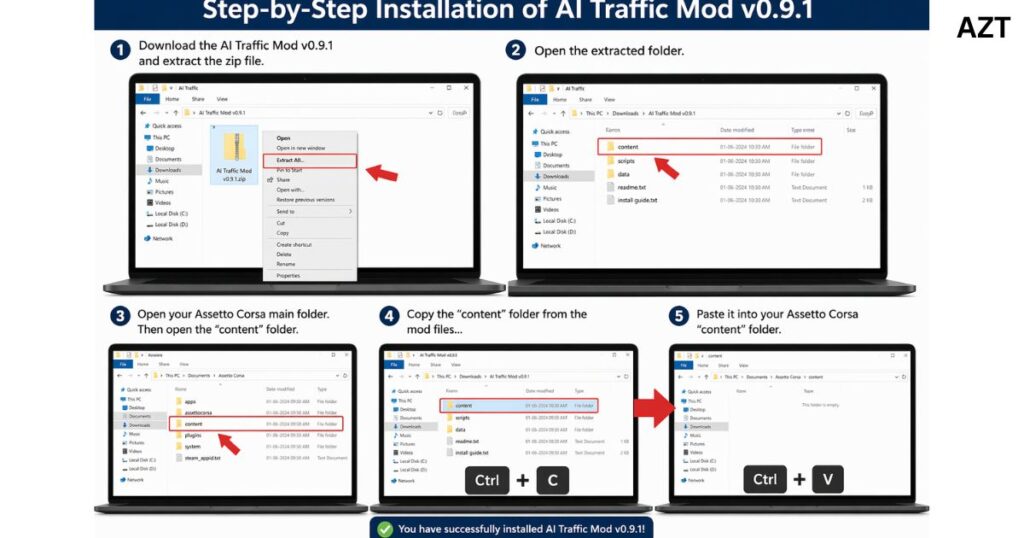
The installation process of Shutoko Revival Project AI Traffic Mod v0.9.1 is simple if done carefully. For it to work right, you need to put files in the right folders and turn on the mod through Content Manager.
First, get the mod package and use any file extraction tool to open it. You will find traffic scripts, configuration files, and AI behavior settings in the folder that was extracted. These files are very important for car instructions. like how to move.
how to react and act on the road.
Now, the next step is to put the files you got into the “content” folder of your Assetto Corsa game. This step is very important for the car’s instructions. When you put the files in the wrong place, the mode won’t load. After that, open Content Manager and activate the AI traffic option under the Shutoko track settings. This allows the system to load realistic traffic flow when you start a session. A common user experience is described like this:
“After installing it correctly, the highway suddenly felt alive with cars behaving like real-world traffic instead of empty roads.”
How AI Traffic Makes Driving More Pleasant
The AI system makes every road feel alive. Cars respond to your movement. They adjust speed and position in real time. This creates a dynamic driving experience. No two runs feel the same.It also adds challenge and excitement. You must plan overtakes and control speed carefully. This increases focus and skill. The system creates a balance between realism and fun.
“Realistic traffic turns a simple drive into a true simulation experience.”
Tools and Requirements for Setup
To run Shutoko Revival Project AI Traffic Mod v0.9.1, a proper setup is important. You need the base game, mod manager tools, and traffic apps. These tools help control AI behavior and improve performance.
A good system also helps. More RAM and a strong CPU improve traffic handling. Proper installation order ensures stability. When everything is set correctly, the mod works smoothly.
| Requirement | Purpose |
| Base Game | Runs the simulation |
| Mod Manager | Easy installation |
| Traffic Tool | Controls AI cars |
| Good Hardware | Smooth performance |
Popular Maps and Tracks for AI Traffic
Different maps create different experiences. Highway maps are best for speed. City maps add complexity and control. Mountain roads bring challenge and tension. Each track offers a unique feeling.Choosing the right map improves gameplay. Some maps are built for traffic simulation. They support better AI flow. This helps create a realistic environment.
| Track Type | Experience |
| Highways | Fast and smooth driving |
| Cities | Tight and technical |
| Mountains | Challenging and risky |
| Coastal Roads | Relaxed and scenic |
Featured Tracks for Realistic Driving
Some tracks stand out because of design and realism. These tracks support natural traffic movement. Roads are wide, detailed, and well structured. AI performs better on such maps.Driving on these tracks feels immersive. Players can explore long routes. Traffic behaves in a stable and believable way. This improves the overall simulation quality.
Future Mods and Upcoming Updates
The modding community continues to grow. New updates and maps are being developed. Some content is available in early access. These updates aim to improve realism even more.Future versions may include smarter AI and better optimization. This means more realistic traffic patterns. Players can expect better performance and more features.
Impact of Racing Trends on AI Traffic Mods
Modern racing games influence mod development. Realism is now a key focus. Developers try to match real-world driving behavior. This improves simulation quality. AI traffic mods follow these trends. They use better logic and smarter systems. This creates a more advanced experience. Players benefit from continuous improvements.
Final Thoughts on Shutoko Revival Project AI Traffic Mod v0.9.1
Shutoko Revival Project AI Traffic Mod v0.9.1 is a major step forward in sim racing. It improves realism, performance, and immersion. The roads feel alive.